Showing posts with label InterneT. Show all posts

অনলাইনে অর্থ উপার্জন করতে চাইলে আগে নিজেকে যে ৩টি প্রশ্ন করতে হবে

“অনলাইনে ঘরে বসে অর্থ উপার্জন” বেপারটা প্রথম প্রথম শুনা মাত্রই এক নতুন কৌতুহলের জন্ম দেয় সবার মনে এবং তারপর অনেকেই হুটহাট করে নেমে পড়েন অর্থ উপার্জনের লক্ষ্যে কোন চিন্তাভবনা না করেই  কিন্তু কিছু  সময় পরে বুঝতে পারেন কাজটা তাদের জন্য না এবং হতাশ হয়ে নেতিবাচক ধারনাও করে বসেন অনেকে।
অনলাইনে আয়
যারা অনলাইনে আয়ের ব্যপারে আগ্রহী তাদের জন্যই আজকের এই পোস্ট।

১. আপনি কত সময় ব্যয় করতে পারবেন অনলাইনে কাজ করার জন্য?

এটাই সর্বপ্রথম মূখ্য প্রশ্ন যা অনেকেই মাথায় রাখে নাহ কাজ শুরুর আগে। প্রতিদিন আপনি কত ঘন্টা সময় ব্যয় করতে পারবেন অনলানে কাজ করার জন্য সেটা অবশ্যই হিসেব করে নিতে হবে অনলাইনে কাজ শুরু করার আগেই।
ধরা যাক আপনি একটি  ডিপার্টমন্টাল স্টোর ব্যবসা শুরু করবেন, তাহলে সমস্থ পরিকল্পনাটা একবার চিন্তা করে দেখুন যে কঠোর পরিশ্রম, অধ্যাবসায় এবং ধৈর্য ধারণ করার মধ্য দিয়েই আপনাকে সেই ব্যবসার সফলতার আনতে হবে।
এমনিভাবে এখন আপনার অনলাইন কাজের পরিকল্পনাটা সাজিয়ে নিন। এখন চিন্তা করলে দেখবেন যে আপনি হয়ত ৬, ৮ অথবা ৮ ঘন্টা অনলাইনে কাজের জন্য ব্যয় করতে পারবেন। অনলাইন কাজ বলে ভাববেন নাহ যে কাজের পরিমান খুব কম এবং কম কাজ করেই আপনি অনেক অর্থ উপার্জন করতে পারবেন। অনলাইন এর বাইরে একটা চাকুরি ক্ষেত্রে যেভাবে আপনি দায়িত্বশীল হয়ে প্রতিটা ঘন্টা কাজ করেন, অনলাইনেও আপনাকে ঠিক সেভাবে কাজ করতে হবে সফলতা অর্জন করতে চাইলে।

২. আপনার লক্ষ্য কি ?

আমার মনে পরে আমি যখন নতুন নতুন অর্থ উপার্জন এর সাথে পরিচিত হয়েছিলাম তখন আমাকে নির্দেশনা দেয়ার মত কেউ ছিল না। এছাড়াও অরেকটি বিষয় হচ্ছে আমার কোনো সুনির্দিস্ট লক্ষ্য ছিল না যার ফলশুতিতে আমি অনেকবার বিফল হয়েছি এবং পরে আমকে অনেকদিন কঠিন পরিশ্রম করতে হয়েছে। আপনি যদি আপনার সফলতার চূড়ান্ত স্থানে পৌছাতে চান তাহলে আপনাকে কাজ শুরুর আগেই একটি সুনির্দিষ্ট লক্ষ্য ঠিক করতে হবে। তা না হলে  লক্ষ্যবিহীনভাবে কাজ করে আপনি কোনো ভালো কিছু অথবা ভালো স্থানে পৌছতে পারবেন না।
ধারা যাক বিভিন্ন দার্শনিক স্থানে আপনি ভ্রমন করতে পছন্দ করেন এবং এই বিষয়ের উপরেই অনলাইন ব্যবসা শুরু করতে চান । তাহলে লক্ষ্য অর্জনের জন্য প্রথমেই আপনাকে ভ্রমন স্থানগুলোর একটা তালিকা করতে হবে এবং যত দ্রুত সম্ভভ লক্ষ্যের ও একটা কাঠমো তৈরী করতে হবে লক্ষ্যের শেষে পৌছানোর জন্য।

৩. আপনি কি ধৈর্য্য ধরে না জানা বিষয় শিখতে ও পরিশ্রম করতে প্রস্তুত ?

আবার ও একটু নিজের অভিজ্ঞতা দিয়ে উদাহন দেই , আমি মনে মনে সপথ নিলাম যে আমি অনলাইনে   অর্থ  উপার্জন করবই, সেই ভাবনা থেকে একটি ব্লগ পোস্ট ও লিখে ফেললাম এবং তারপরই নিজের ই-মেইল চেক করলাম কিন্তু কোন রিপ্লাই পেলাম না। কারণ আমি   তখন আমি অনলাইনে অর্থ উপার্জনের পদ্ধতিগুলো সম্পর্কে অবগত ছিলাম না। পরে বুঝলাম যে আমাকে আগে অর্থ উপার্জনের পদ্ধতিগুলো ভালোভাবে জানতে ও শিখতে হবে এবং তারপর ধৈর্য্য ধরে পরিশ্রম করে যেতে হবে ।
অবশেষে বলব , যারা অনলাইনে  অর্থ উপার্জন শুরু করার কথা ভাবছেন তারা নিজেদের এই ৩তি প্রশ্ন করে এবং তার উত্তর চিন্তাকরে ভালোভাবে  উপলব্ধি করে তবেই শুরু করুন । তা নাহ হলে কিছু সময় পার হবার পরই মনে হবে যে আপনি শুধু শুধু সময় নষ্ট করছেন এবং করেছেন যা আপনার বাস্তবিক জীবনে নতুন হতাশা তৈরী করবে । আজ এই প্রজন্তই সবাই ভালো থাকবেন। আল্লাহ হাফেজ।

অনলাইনে আয় করার সবচেয়ে নির্ভরযোগ্য ৫ পদ্ধতি

অনলাইনে অর্থ আয়ের ব্যপারে মোটামুটি সবাই কমবেশি শুনেছেন। অনেকে হয়ত চেস্টাও করেছেন কিন্তু সফল হতে না পেরে হাল ছেড়ে দিয়েছেন। প্রয়োজনী দিক নির্দেশনার অভাবে অনেকে শুরু করতে চেয়েও পারেননি। অনলাইনে অর্থ আয় খুব সহজ কোন ব্যপার নয়। একটি ব্যবসায় বা চাকুরিতে যেমন পরিশ্রম করার দরকার হয়, অনেক ক্ষেত্রে অনলাইনে তার চেয়েও বেশি পরিশ্রম এবং সময় দেয়ার প্রয়োজন পড়ে। এ পথে কোন শর্টকাট নেই। অনলাইনে আপনার প্রথম ১০০ ডলার আয় করতে ১ বছরও লেগে যেতে পারে এবং এটি মেনে নিতে হবে। এসব প্রতিবন্ধকতা পার করে বাংলাদেশ এবং বিশ্বের অনেকেই প্রতি মাসে অনলাইনে হাজার হাজার ডলার আয় করছেন।
অনলাইনে আয় অর্থ উপার্যন
আমার আগের পোস্টটিতে লিখেছিলাম অনলাইনে আয় করতে চাইলে নিজেকে যে ৩টি প্রশ্ন করতে হবে সে সম্পর্কে। পোস্টটিতে অনেকেই জানতে চেয়েছেন কিভাবে এ রাস্তা ধরে এগুতে হবে এবং কোথায় এগুলো শেখা যাবে। সেসব প্রশ্নের উত্তর নিয়েই আমার আজকের পোস্ট।

১ – ওয়েব কন্টেন্ট থেকে অর্থ উপার্যন

এ পদ্ধতিতে যে কোন বিষয়ের উপর আপনার একটি ওয়েব সাইট দরকার হবে। ব্লগ অথবা সাধারন স্ট্যাটিক ওয়েব সাইট থেকে যে কোন একটি বেছে নিতে পারেন। বিষয় নির্বাচন এক্ষেত্রে গুরুত্বপূর্ন একটি বিষয় এবং সাইটের কন্টেন্ট যথেস্ট ভাল হতে হবে। ভাল মানের পর্যাপ্ত পরিমানে কন্টেন্ট যুক্ত করার পর সেই ওয়েব সাইটে সোশ্যাল মিডিয়া এবং সার্চ ইঞ্জিন থেকে ভিজিটর আনার ব্যবস্থা করতে হবে। পর্যাপ্ত পরিমান নিয়মিত ভিজিটর পেলে নিচের যে কোন পদ্ধতি ব্যবহার করে অর্থ উপার্যন সম্ভব।
- এডসেন্সঃ ওয়েব কন্টেন্ট থেকে অর্থ উপার্যনের সবচেয়ে জনপ্রিয় পদ্ধতি হচ্ছে এডসেন্সের বিজ্ঞাপন প্রদর্শন। ভাল মানের একটি ওয়েব সাইটে সার্চ ইঞ্জিন থেকে ভিজিটর পেলে এডসেন্সের মাধ্যমে আয় করতে পারেন। এডসেন্স থেকে প্রতি মাসে কয়েক হাজার ডলার আয় করেন এমন অনেকেই রয়েছেন বাংলাদেশে। তবে এডসেন্স থেকে আয় করতে হলে ইংরেজীতে লেখালেখি এবং সার্চ ইঞ্জিন অপটিমাইজেশনে পারদর্শী হতে হবে।

- এফিলিয়েটঃ এমাজন, ক্লিকব্যাংক সহ বিভিন্ন এফিলিয়েট সেবাদাতার দেয়া লিংক ব্যবহার করেও আপনার ওয়েব কন্টেন্ট থেকে আয় করতে পারেন। এক্ষেত্রে লয়াল ভিজিটর এবং সার্চ ইঞ্জিন এর ভিজিটর প্রয়োজন।
- ওয়েব সাইট ফ্লিপিং: এই পদ্ধতিতে আপনার তৈরি করা ওয়েব সাইটটি বিক্রি করে অর্থ উপার্যন করতে পারেন। ওয়েব সাইট ক্রয়-বিক্রয়ের সবচেয়ে জনপ্রিয় ওয়েবসাইট flippa.com এ চোখ বুলিয়ে দেখতে পারেন এ সম্পর্কে ধারনা পেতে।
ওয়েব কন্টেন্ট থেকে অর্থ উপার্যন এর বিভিন্ন টিউটোরিয়ালে ভরপূর কয়েকটি ওয়েবসাইটঃ www.nichepursuits.com, www.SmartPassiveIncome.com, www.problogger.net

২ – সেবা প্রদানের মাধ্যমে অর্থ উপার্যন

এ প্রক্রিয়ায় একটি ওয়েবসাইটের মাধ্যমে বিভিন্ন রকম সেবা প্রদান করে আয় করা সম্ভব। গ্রাফিক্স ডিজাইন, ওয়েব ডেভেলপমেন্ট, এসিও যেকোন একটি বিষয়ে পারদর্শী হলে একটি ওয়েব সাইট খুলে সেটির মাধ্যমে এসকল সেবা প্রদান করতে পারেন। কোন কিছুতে দক্ষ না হলে ওয়েব হোস্টিং এবং ডোমেইন রেজিস্ট্রেশন সেবাদান করে আয় করতে পারেন। বাংলাদেশে অনেকগুলো প্রতিষ্ঠান রয়েছে যারা রিসেলার হোস্টিং এবং ডোমেইন বিক্রয় করে থাকে। মাত্র ১৫,০০০ টাকা আর একটি ওয়েবসাইট তৈরি করেই নেমে যেতে পারেন হোস্টিং ব্যবসায়ে।
উদাহরন হিসেবে চোখ বুলিয়ে দেখতে পারেন কয়েকটি ওয়েব সাইটে…
www.jaskgroup.co.uk, www.IncredibleLab.com, www.TutoHost.com

৩ – ফ্রীল্যান্সিং এর মাধ্যমে অর্থ উপার্যন

এ পদ্ধতিটি অনেকটা সেবাদানের মাধ্যমে আয় করার মতই। তবে এক্ষেত্রে নিজস্ব ওয়েব সাইটের মাধ্যমে সেবা প্রদানের বদলে ফ্রীল্যান্সিং মার্কেটপ্লেস এর মাধ্যমে সেবা প্রদান করা হয়। ফ্রীল্যান্সিং করে অর্থ উপার্যন ব্যপক জনপ্রিয়তা পেয়েছে ইতোমধ্যে। ইচ্ছেমত কাজ বেছে নেয়ার সুযোগ এবং যেকোন জায়গা থেকে কাজ করার স্বাধীনতা থাকার কারনে অনেকেই ফ্রীল্যান্সিং এর দিকে ঝুঁকে পড়ছেন। ডিজাইন, ডেভেলপমেন্ট, এসিও এরকম যেকোন একটি কাজে পারদর্শী হলে যেকোন ফ্রীল্যান্সিং মার্কেট প্লেসের মাধ্যমে আয় করা সম্ভব।
- ওডেস্ক টিউটোরিয়ালফ্রীল্যান্সার টিউটোরিয়াল.

৪ – ডিজিটাল পন্য বিক্রির মাধ্যমে অর্থ উপার্যন

ডিজিটাল পন্য বিক্রয় করেও অনেকেই সাফল্যের দেখা পেয়েছেন অনলাইনে। স্টক ফটো, স্টক গ্রাফিক্স, ই-বুক ইত্যাদি বিক্রয় করতে পারেন বিভিন্ন ওয়েবসাইটের মাধ্যমে।
- স্টক ফটোঃ ভাল মানের একটি ক্যামেরা থাকলে নেমে যেতে পারেন স্টক ফটো বিক্রি করে আয়ের পথে। স্টক ফটো বিক্রয়ের কয়েকটি ওয়েবসাইটঃ iStockphotoShutterstockStockxpert
- স্টক গ্রাফিকঃ স্টক গ্রাফিক্স বিক্রয় করতে পারেন graphicriver.net এ।
- ই-বুকঃ একটি ই-বুক তৈরি করে বিক্রয় করতে পারেন e-junkie.com এর মাধ্যমে।

৫ – ই-কমার্স, ক্ল্যাসিফাইড এডের মাধ্যমে অর্থ উপার্যন

- ই-কমার্সঃ বাংলাদেশে ই-কমার্সের জনপ্রিয়তা দিন দিন বেড়ে চলেছে। বেশ কয়েকটি ই-কমার্স সাইট সাফল্যের সাথে এগিয়ে চলেছে কয়েক বছর ধরে। এই সেক্টরটি খুব বেশি ক্রাউডেড হয়ে যাওয়ার আগেই চেস্টা করে দেখতে পারেন। টি-শার্ট বিক্রির একটি ই-কমার্স সাইট tzonebd.com এ চোখ বুলিয়ে দেখতে পারেন এ সম্পর্কে আরও ধারনা পেতে।
- ক্ল্যাসিফাইড এডঃ ক্লিকবিডি, সেলবাজার দীর্ঘদিন ধরে তাদের ব্যবসায় পরিচালনা করে যাচ্ছে বাংলাদেশে। বিক্রয় ডট কমও অল্প সময়ে ব্যপক সাফল্যের দেখা পেয়েছে। একটি ক্ল্যাসিফাইড এড সাইটও হতে পারে অনলাইনে আপনার সাফল্যের চাবিকাঠি।

IObit Driver Booster PRO 1.1.0.551 ML+ Key


image


IObit Driver Booster PRO - efficient and simple driver update tool, it is - a new program that fits perfectly into the product line IObit. Outdated drivers can significantly affect the performance of your computer and cause system crashes. Driver Booster scans and detects outdated drivers automatically downloads and installs updates with one click, saving you time. IObit Driver Booster - a great tool to protect your PC from hardware failures, conflicts and system crashes.

One of the main advantages of the utility - it's ease of use, the highest possible, it is designed for the average user: the user must press the menu button "Scan" after found to be outdated software can be updated only them, but you can select the "Refresh All" . The function "More info" - is intended for those users who are themselves "care" about your computer and want to know which driver is the function that performs.

The program's interface is not saturated by different design excesses, all applications were severed in a single design, which allows easily perform the desired action. Update all drivers is particularly useful for those who use the latest versions of various games, as advanced driver significantly increase the performance of your computer. Moreover, it is designed to adjust the drivers for better performance in games.

Key features:

Automatically detects outdated drivers
Update in 1 click for maximum performance equipment
Tuning driver for speed games
Speed, safety and ease of use

Information about the program:

Year: 2013
Platform: Windows ® 8/XP/Vista/7
Language: Multilingual + Russian
Warz: Key
File Size: 16.19 MB
Registration key: 2EC72-368A4-5E4E9-D54A1

About Google Mail And Maintenance


 There are so many competitive email service providers on the Internet today . One of the most popular advertising-based web-mail is called Gmail . You can access your email wherever you are even if you are far away from your PC or laptop . There are several great features that you will experience once you create your own email account with Gmail . The fact that you can send and receive email for free , you can also send text messages and even chat to different people across the world . You will also be able to identify which emails are important by labeling them or highlight them using the star button . You can also easily search for previous emails by simply typing any keywords , which are related to the email you are looking for . There are so many significant reasons why people use Google Mail or Gmail to connect to people in all parts of the planet .
One of the reasons why Gmail is very popular to all types of individuals is that Google created a mobile version called Gmail Mobile . People who own mobile phones or the so-called smartphones are now downloading and installing Gmail Mobile on their devices . The features and functions are almost the same as the desktop version and the service is also free . Many individuals are conveniently using the mobile webmail service and they absolutely love it . There are some system requirements that you may identify before installing the Gmail app to your mobile device . Make sure that your phone is compatible and you are good to go .
If you love using tablets like the iPad , you can now access your email using this trending device . Gmail on iPad is probably one of the most advance innovations that Google has to offer in the world of web-based mail . Apple and Google's collaboration on this breakthrough is simply one of a kind .
Another reason why people use Gmail is that you can test its new features even on those in experimental mode with the so-called Gmail Labs . The Spam filter feature is very useful as well , where you mark unwanted emails as spam . You can also try the Google Voice in Gmail chat where you can make calls anywhere in US and Canada for free as their initial promo . Your account will also be protected , as Google requires a cell phone number when you are
creating your account . You will also receive a verification code to verify your identity and proceed to the creation of your account .
Furthermore , there are many other reasons why choose to use Gmail . If you have no Google account just yet , register and find those awesome gmail features that you would surely love.

 Want To Delete Your Gmail Account ?

There are so many reasons to close a Gmail account . Your account may have been hacked into several times hence you need to change it or you need a simpler username or address . If you have no idea how to delete a Gmail account ,
To do so follow steps given below :

The first step is to get into a Google browser . Google .com is usually the simplest to operate from . You should then go to the sign in option which requires you to access the account . Once you have accesses your account you can now start the process .

On the top right of the page you there is a settings tab . Select and open that tab and go down the menu , to Google Account Settings . This option is available for any Google service or accounts you are using or have logging into .

Clicking on this will take you to a page where you find your
Profile , Personal Settings and the Google Products that are available in your account . On the products section you will find the products that you can change for your Google account . Open the Edit link which takes you to the edit page .

This is the page where you can now delete your account . Here you will find links to products that you can permanently delete from your account . By selecting Remove Gmail Permanently link , you will end up in a page that now allows you to finalize the deletion of the account . You will also be required to read a message from Google about deleting the Gmail account .

Mark the box that indicates Gmail . This removes the email option and leaves out the other products you may still want to use with Google . However you may have to insert a new email address . You can use your current password to finalize the removal by clicking on the Remove Gmail button .

However you can still create another email account using your Gmail account . Emails that come during the period you have removed your account will not be accessible .

Offline Gmail Access

 Friends,as we knows Googlemail provides more than 7.6 Gb of place which is raising every second.So, you don¡¯t have to remove even a single e-mail due to lack of place.Their are a lot of addtional features like in Googlemail laboratories like Addtional talk emotional baggage , Critique  Lite which can be triggered when required.Now you can also get the capability to reach Googlemail in in the real world method which can be really useful if you don¡¯t have web access but are in need of immediate use of your address. Although in in the real world method  you can't deliver an e-mail but can study, handle your messages. This technique will work only on google web browser.
Google Chrome
Open your web browser and download Offline Gmail Extension.
You May Download it from HERE.
Next step Install this extension by hitting Add to google chrome and choose offline Google Mail.
Now after this choose,Allow offline Mail option n press on Continue option.
Your Googlemail account
will instantly get synchronized whenever you run chrome web browser in option web access(internet availability).
Try it.

 How To Stop Gmail Hackers 

Friends,Gmail is commonly hacked by criminals who want to send spam from your email account to people in your contact list because they know it's much more likely to be opened as the person knows you . If there has been an unusual amount of activity on your account , or if the account has been logged into from IP addresses that you don't normally use , Google will eventually take notice and send you an email alert to change your password .

If you are afraid your Gmail account has been or will be hacked , you can use a handy tool that Google provides to help you . First , log into your Gmail account and then scroll to the bottom of the page . You will see a line of text that says something like :

Last account activity : 5 hours ago at this IP ( 115 .127 .100 .99 ) . Details

Click on Details and a chart will pop up that lists all activity on your account .

In the chart you will see the last IP addresses that logged into your account . You will see the IP addresses that you use to log in with . If an unusual address shows up in the list , Gmail will show it in red . If you haven't logged in from the place listed in red , your Gmail account has been compromised .

There is also a button at the top left of the chart that says "sign out all other sessions ." Press this button if you see that someone is logged into your account . It will boot them out and you can change your password .

At the bottom of the chart you will see change . If you click this button , you will be given the opportunity to have Google alert you if there has been suspicious activity on your account . The alert will only be visible to you ; the hackers won't be able to see it .

It's also important to change your
password at least twice a month . Don't use the same password for every website you go to . That makes it much easier for the hackers to get your password . They won't try to get your password from a website with good security like your bank ; they'll get your password from a website you have an account with that doesn't have good security like an online forum or a shopping site . If your password is the same everywhere the hacker may log into your financial accounts .

BLOCK UNWANTED MAILS IN GMAIL

want to block some unwanted emails in gmail ?

JUST follow these steps
1. Login to your account
2. At the top-right corner, click on Settings
3. Under Settings, click on Filters
4. You’ll now see an option “Create a new filter“, click on it
5. Now in the Form field enter the email address from which you do not want to receive emails
For ex. you may enter abc@xyz.com in the From field to block all incoming emails from this address. However if you want to block the whole domain then use the following syntax: *@xyz.com. Now all the incoming emails from the domain xyz.com will be blocked.
6. Click on Next Step, select the action you’d like to take on the blocked emails. You may select the option Delete it so that the blocked email is moved to trash. To unblock the email, all you need to do is just delete the filter that you’ve created.

 CHECK MAIL SEND BY YOU HAS BEEN READ OR NOT

Some time we its really important to know that the email sent by us has been read or not. you will not find any inbuilt feature for this in most of mail server.


but here is a good trick to know that email has been read or not

"http://goo.gl" is the solution for this.
If your email contains one or more link then this solution can be very helpful for you.

It is very simple to use this.
you have to follow these steps:-

* Open the url "http://goo.gl"
* Paste your url(which will be provided by you in your email) in the text box given here.
* click the button. now your url will get shorten.
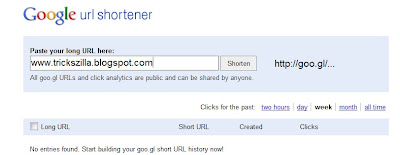

* now put this url in your email.
* send your email.


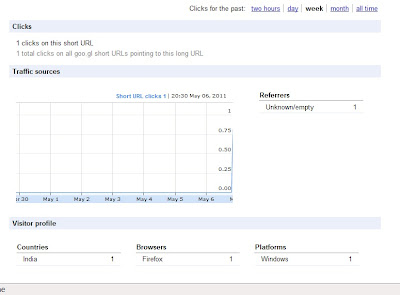
Now whenever the recipient open this url in your mail his activity will be captured by http://goo.gl.
You can see this activity by adding '+' sign to Google short URL.
For example if you get the shorten URL of your link is http://goo.gl/dpAKF. Now you can see the stat by writing "http://goo.gl/dpAKF+" in your address bar.


Google Adsense Approval Trick

Google Adsense is One of Google Product, Google Adsense is an Adnetworking (Advertisement Networking) Site, Article Writter easy to Earn Huge Residential Income from Google Adsense,
now a day Getting Google Adsense Account approval is very tought   in  India,pak and Others Countries Free.Here is an One easy way to get fast and Genuine Google adsense approved today i will teach you how to get adsense account easily without
website or blog.

Flixya is a social networking community website there You can Upload photos and Videos and Write Quality articles. It powered by Google. It offer 100% Adsense and You can
Get Fast Adsense Account Approval Using Flixya.com
Follow these steps.

The easy way is to sign up for new gmail account if you have no gmail account.Sign up for flixya.com During sing up process for flixya.com you will be asked:

Do you already have Adsense account?

Select: No

Now option to signup for Google Adsense will appear with the same gmail account through which you signed up flixya.
 Now clicking on signup button for Google Adsense you will receive emails in gmail account from both flixya and Google Adsense.Flixya will ask you to continue signup and Adsense will ask you to complete signup process by clicking on the link given in the email.

After completing sign up form with accurate information Google Adsense will ask you to wait for 2 days for reviewing your application.Within 2 days you will get mail from Google Adsense about approval or disapproval of your Adsense account.

I hope that above information will be useful for everyone those who are having problems in approving Google Adsense account.if you want to get google adsense within 2 hours.then i can help you.this service charges per account.leave your details,payee name,address,cellphone number in any post.i will contact you.
i m selling this trick.if anybody wana buy,may contact me.

Trick To Make 15$ daily From Google Adsense

Guys,today  sharing some useful tips on how beginners can make money through Google Adsense program by sacrificing 30 minutes of their time daily . I will try to be simple and will also teach you how to get quality content for your blog without thinking much about what to write . Below are useful tips on how to make at least $15 daily from Google Adsense with blogger .
 Launch www .blogger .com in your browser to register for a free blog .
Your blog name must be high searching volume niche related.
Now that you’ve set up a blog , what you need now is to start posting article on the blog . 
Always try to make 3 post daily
The next thing you need is to start getting visitors to your blog . You can get visitors to your blog by sharing and telling your friends on Facebook , Twitter & other social networking site . You can also get free visitors from forums related to your blog topic . remember  that No visitors = No click n no click means = No money Try your best to get visitors to your blog .
Immediately you begin to notice at least 100 visitors on your blog , place Google Adsense ads on it .
If you’re having more than 100 visitors on your blog daily , you will start seeing some changes in your earnings But if you’re not having up to 100 visitors on your blog daily don’t be upset , just keep posting and don’t relent in your effort .
Just ping
your blog on pingomatic .com . this step will bring the search engines bot to your site in very short time to indexing.indexing increase the your online visibility.
Try it once.

Facebook Timeline

Friends ,you probably already spend quite a bit of time on Facebook , but did you know that you could customize it further with the help of a newly launched feature ? It is called Facebook Timeline and it provides you the best way to express your personality . You can create your own online scrapbook almost effortlessly thanks to this new feature of Facebook that helps you manage your photos and information about you better . In fact , it is what your Facebook profile will be from now on .

Facebook Timeline works by arranging all the content you have already shared on this site . It is in reverse chronological order so that all the latest and most interesting photographs and stories about yourself are right at the beginning . You will love this feature because it helps you draw the attention of all your friends to important events in your life .

Facebook Timeline is really flexible and easy to use . You can get really creative with regards to the information and photographs you wish to feature on it . If you feel that
a little pruning is in order then you will easily be able to do it . In fact , you can add photos wherever necessary in order to tell the story of your life better . In addition , you'll be able to add interesting captions to each of these photos in order to make them more attention-grabbing . More importantly , you'll also be able to go back and remove photos that you might have posted earlier on but certainly don't want to feature on your profile page !

You will like the layout of your Facebook profile thanks to this feature . There will be a large photo called a cover photo right on top , with an inset of the profile photo .Facebook covers will be the first thing people will see when they visit your timeline . It appears as two columns side by side . There will be a larger column on which readers can view the content next to a smaller one to the right . The smaller column helps to navigate the information very easily and quickly . Once you start using this feature , you'll have limited time before it gets published . You can publish it straight away or wait until you have finished doing it completely . Facebook only gives you seven days in order to get it in order before it publishes it , but most people consider this to be sufficient .

Facebook respects your need for privacy . If you had originally posted your photos with certain privacy settings then Facebook Timeline will retain them . Therefore , only the people you had originally shared specific posts with will be able to see these photos on your timeline . Of course , you can always change your privacy settings again .

Facebook changes its settings from time to time , and this too might happen with this new feature . All the same , Facebook Timeline is definitely going to be used by all people who use this site because it helps them to express themselves perfectly . After all , doesn't everyone love to tell their life's story to friends or anyone.

Make Money From Your Blog

Friends,in this post i will tell you that how you can make money from your blog or website.
No wonder,some peoples making hundred of dollars in a day.
Lets comes to the point.
Well,you may generate income by showing advertising ads on your web or blogsite.
This is an excellent way to generate income on your site by showing ads is by recognizing advertising ads on your site. All you need to do to really generate income this way is to personalize your design to be able to present whatever ad structure you want.

To make online cash via advertising ads can take some time, but there are people generating countless numbers per month through them alone. All you need to do is concentrate on getting visitors to your site and you will be able to create enough cash using this means on the long run.
So are you ready to generate income from your web page or blog?

What Makes Google AdSense Special

What Creates The the search engines AdSense Software So Special
The significant agreement in which The the search engines AdSense app features is such that The the search engines has the significant management over the Ads that are regarded on the internet sites established upon The the search engines AdSense app. Of course, the on the internet expert can personalise how an Ad looks and also block/filter certain kinds of Ads on their web page. The Ads that The the search engines allows are ‘Senseful’ Ads (these Ads are actually appropriate to the issues that the web page discusses/ caters-to). This is something that is not discovered in other advertising and advertising programs/systems. Consequently a win-win circumstance for everyone.

The those who are looking at the web page (that contains The the search engines AdSense Ads) are doing so because they are considering the product/service/topic that is talked about on that web page. It would be of little use to them if you were to provide Ads that are not appropriate to the subject in any way. However, Ads appropriate to the subject of the web page would really assert useful to the invitee. They might actually be considering things that is being offered through The the search engines AdSense Ads. So, visitors get a better genuine comprehension due to AdSense app.

Website companies get income for showing the The the search engines AdSense Ads and for the important they be given on the Ads. So, they are pleased too. As far as businesses/advertisers are troubled, they get something (AdSense system) for based advertising and advertising that is both easy and cost-effective to operate.

Moreover, The the search engines AdSense Ads are offered in a much better way than the advertising Ads or other kinds of Ads. Most of the Ads are easy thoughts Ads that are clear and valuable. The companies discover out it easy and the causes discover out it easy too. The the search engines AdSense is really one of the best advertising and advertising applications available these days.

Google Searching Tricks(Google Secret)


First of all go to Goggle .com .

put your searching string in google search like this :

"parent directory " DVDRip -xxx -html -htm -php -shtml -opendivx -md5 -md5sums

"parent directory " Gamez -xxx -html -htm -php -shtml -opendivx -md5 -md5sums

"parent directory "Xvid -xxx -html -htm -php -shtml -opendivx -md5 -md5sums

"parent directory " /appz/ -xxx -html -htm -php -shtml -opendivx -md5 -md5sums

"parent directory " Name of Singer or album -xxx -html -htm -php -shtml -opendivx -md5 -md5sums

"parent directory " MP3 -xxx -html -htm -php -shtml -opendivx -md5 -md5sums"parent directory " MP3 -xxx -html -htm -php -shtml -opendivx -md5 -md5sums
Notice that only change the word after the parent directory , change it to what you want and you will get a lot of stuff .
That's it .

How to find the IP address of the sender in Yahoo! mail

When you receive an email, you receive more than just the message. The email comes with headers that carry important information that can tell where the email was sent from and possibly who sent it. For that, you would need to find the IP address of the sender. The tutorial below can help you find the IP address of the sender. Note that this will not work if the sender uses anonymous proxy servers.

Finding IP address in Yahoo! Mail

1. Log into your Yahoo! mail with your username and password.
2. Click on Inbox or whichever folder you have stored your mail.
3. Open the mail.
4. If you do not see the headers above the mail message, your headers are not displayed. To display the headers,
* Click on Options on the top-right corner
* In the Mail Options page, click on General Preferences
* Scroll down to Messages where you have the Headers option
* Make sure that Show all headers on incoming messages is selected
* Click on the Save button
* Go back to the mails and open that mail.
5. You should see similar headers like this:Yahoo! headers : nameLook for Received: from followed by the IP address between square brackets [ ]. Here, it is 202.65.138.109.That is be the IP address of the sender!
6. Track the IP address of the sender

How to find the IP address of the sender in Hotmail


When you receive an email, you receive more than just the message. The email comes with headers that carry important information that can tell where the email was sent from and possibly who sent it. For that, you would need to find the IP address of the sender. The tutorial below can help you find the IP address of the sender. Note that this will not work if the sender uses anonymous proxy servers.
Finding IP address in Hotmail
1. Log into your Hotmail account with your username and password.
2. Click on the Mail tab on the top.
3. Open the mail.
4. If you do not see the headers above the mail message, your headers are not displayed. To display the headers,
* Click on Options on the top-right corner
* In the Mail Options page, click on Mail Display Settings
* In Message Headers, make sure Advanced option is checked
* Click on Ok button
* Go back to the mails and open that mail.

5. If you find a header with X-Originating-IP: followed by an IP address, that is the sender's IP addressHotmail headers : name ,In this case the IP address of the sender is [68.34.60.59]. Jump to step 9.
6. If you find a header with Received: from followed by a Gmail proxy like thisHotmail headers : nameLook for Received: from followed by IP address within square brackets[].In this case, the IP address of the sender is [69.140.7.58]. Jump to step 9.
7. Or else if you have headers like thisHotmail headers : nameLook for Received: from followed by IP address within square brackets[].In this case, the IP address of the sender is [61.83.145.129] (Spam mail). Jump to step 9.
8. * If you have multiple Received: from headers, eliminate the ones that have proxy.anyknownserver.com.
9. Track the IP address of the sender

Multiple Logins in yahoo without Software

1) Go to Start
2) Navigate to HKEY_CURRENT_USER-->Software-->Yahoo-->Pager-->Test
3)ON the Right side if the page , Right click and choose new Dword Value.
4) Rename it as " Plural ".
5)Double click and assign a decimal value of 1.
6) Now close registry and restar yahoo messenger and try Multiple Login

Free Hotfile Premium Account and Link Generator 2011


Hotfile is yet another file hosting site which is becoming more popular now because of its ease of user interface and fast download speed (even without a hotfile premium account). Hotfile has been on the market since early 2008 and has now grown to a level where it can now compete with other popular file hosting site on the internet. Purchasing a Hotfile premium account will cost you about USD 9 a month, or even cheaper if you purchase a longer term premium account. We’ll show you more about Free Hotfile Premium Account and Link Generator 2011 in the following paragraphs.
Hotfile Premium Account grants you the ability to download files from Hotfile at full speed with no limit number of simultaneous downloads. If you download any file without a hotfile premium account, your download will be limited to only one single connection at a time and with a slower speed. This is the reason why Hotfile charges you some bulks for granting you extra privilege via Hotfile Premium Account. This however has lead to a false perception where a single account may be shared by multiple users, and thus this encourages hotfile premium account hacking and cracking. To resolve this problem, Hotfile, as well as other file hosting companies have suggested a solution which bans accounts that are found to be used in multiple IPs at a same time. So, we’re pretty sure that most free Hotfile premium account usernames and passwords that are shared in some suspicious websites you found from Google are most likely not working anymore, and those websites might lead you to malicious codes which could infect your computer.

What is Hotfile Premium Link Generator?

There’s something commonly known as Hotfile Premium Link Generator which generates links that allow you to download Hotfile files at full speed and in simultanuous downloads. However, such service is especially limited as behind the generator there’re some Hotfile premium accounts being bound to it. If these accounts are found to be misused by the Hotfile Team, the accounts would still be banned and the generator will not work after that. Only a tiny number of generators get updated and work constantly, yet they might not work some times. It would be a skillful task to find a working Hotfile premium link generator. We wouldn’t recommend you to search for one in Google as most results shown in the first ten pages are the most concerned to Hotfile Team. You can try your luck at social bookmarking sites such as Stumble Upon of Digg.
However, we will constantly share working generators we found with our subscribers via email. Subscribe to us and get updated with the latest working generators, as well as other tech tips.